
Cascade Sync & Automate
Unifies HR, IT, and Finance data into a single employee record using Atomicwork connectors and JumpCloud identity data.
Primary Use Cases
Category | Example Scenario | Integrated Systems |
Data Integration | HRIS (i.e.Workday/Ultimate/ADP/Other) with IT (EntraID/JumpCloud) and Finance (NetSuite/Cube/). | Atomicwork + JumpCloud + HRIS |
Org Visibility | Creates real-time org charts and headcount dashboards. | HRIS + Cascade Insights |
Access Mapping | Maps HR attributes (title, dept) to IT roles automatically. | HRIS + IDP |
Budget Alignment | Links workforce changes to cost centers. | Finance + HRIS |
Target Buyer Titles & Pain Points
Job Title | Department | Key Pain Point |
Director of IT / Enterprise Architect | IT | HR and directory data mismatched; causing provisioning errors. |
VP of HR / HRIS Lead | HR | HRIS and payroll data don’t match active directory records. |
Finance Controller | Finance | Payroll and FTE reports don’t align across departments. |
Example
Client: Plaid
Challenge: Duplicate employee records between Workday, Okta, and NetSuite.
Solution: Cascade Sync built a golden employee record, feeding downstream systems.
Outcome: Reduced data mismatches by 95%, saving Finance and HR ~400 hours/quarter.

Core Narrative Diagram (High-Level Overview)
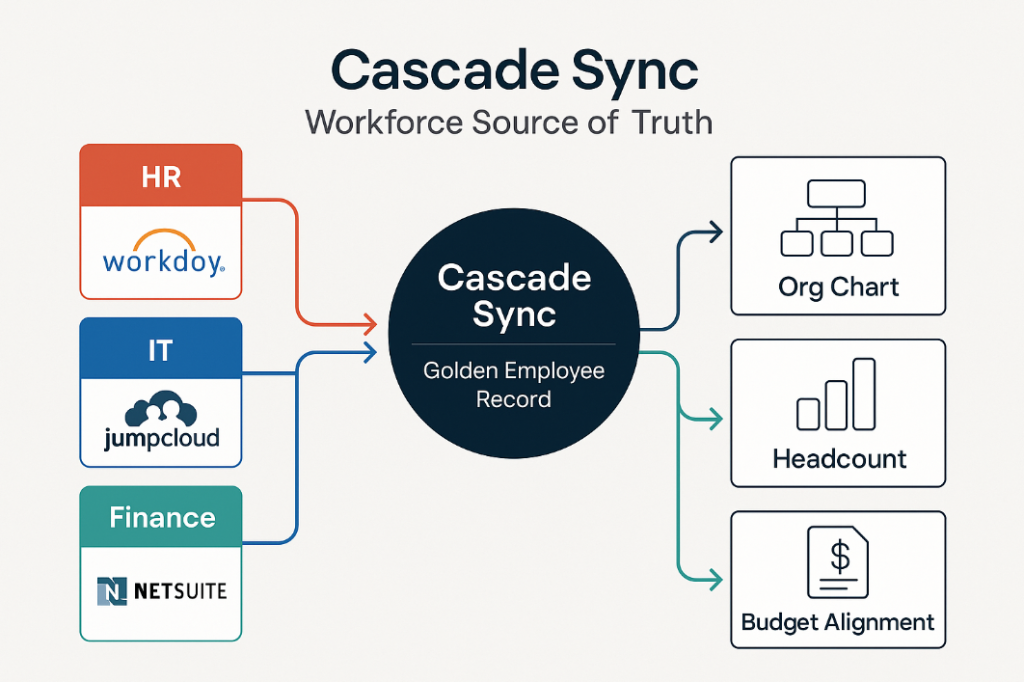
Type: Systems Map or “Golden Record Flow”
Purpose: Show how Cascade Sync becomes the Workforce Source of Truth.
Visual Structure:
- Three inbound lanes → HR (Workday), IT (JumpCloud), Finance (NetSuite).
- Center node: Cascade Sync (Golden Employee Record).
- Outbound arrows → real-time dashboards (Org Chart, Headcount, Budget Alignment).
Audience: C-suite & VP-level decision-makers.
Use Case: Website hero graphic, pitch decks, and one-pager.
Unlock Seamless Workforce Automation
Streamline your HR and IT operations with workflows that eliminate manual tasks, reduce onboarding delays, and improve compliance accuracy. Our team will help you design, integrate, and optimize automated processes tailored to your organization’s needs.
Let’s talk about your automation goals.

When to Use (Trigger Scenarios)
- After completing a Cascade Advisory or Audit
- During system upgrades such as new HRIS, identity, or ITSM deployments
- When organizations expand into remote or global operations
- Following a compliance incident tied to manual processes

How It Works
- Design Phase – Map employee lifecycle workflows and systems in scope
- Integration Setup – Connect HRIS, identity, and IT tools using Atomicwork connectors
- Automation Configuration – Deploy agents to manage provisioning and approvals
- Governance Enablement – Implement reporting, logging, and metrics for oversight
- Tuning & Optimization – Continuously refine workflows to adapt to new changes
Key Benefits
- Accelerates onboarding and offboarding by up to 90 percent
- Reduces manual ticket volume across HR and IT teams
- Provides transparent, auditable workflow governance
- Enhances employee experience through faster access and approvals

Deliverables
- Fully configured automation workflows
- Integration blueprint and documentation
- Governance and analytics dashboards
- Post-launch performance optimization support